
The Hidden Cost of Manual Client Onboarding
Every time a client signs with your business, a familiar dance begins: scattered emails, forgotten documents, delayed project kickoffs, and team members asking "Did anyone brief the team yet?"
The Reality of Manual Onboarding
Let's map out what actually happens when a client signs:
Your Current 6-Step Process:
Client signs contract
Email requesting documents + multiple follow-ups
Assess team capacity and available resources
Create folders, project dashboards, and team chats across multiple platforms
Compile and send team brief from scattered call notes
Send confirmation email to client
The Real Cost:
4-8 hours of manual work per client (across multiple team members)
3-4 working days to complete (assuming the client is responsive)
High error rate from copy-paste mistakes, forgotten steps, and miscommunication
Inconsistent experience depending on who handles the onboarding
Team bottlenecks during seasonal traffic spikes
Customer success managers spend over 25% of their time on basic onboarding tasks Skilljar instead of strategic work that drives revenue.
Why This Breaks Down at Scale
When you're onboarding 5-10 clients simultaneously, this manual process becomes unsustainable:
❌ Document requests get lost in email threads
❌ Project management tools (Asana, Monday, ClickUp) aren't connected to your CRM
❌ Communication channels (Slack, Teams, Gmail) operate in silos
❌ File storage (Google Drive, OneDrive, Notion) isn't organized consistently
❌ Team members don't know who's assigned to what
The result? 86% of customers say they'll remain loyal if they receive strong onboarding CMSWireUserpilot—but you're delivering inconsistent experiences that undermine trust from day one.
What Automated Onboarding Looks Like
Here's the same process—automated:
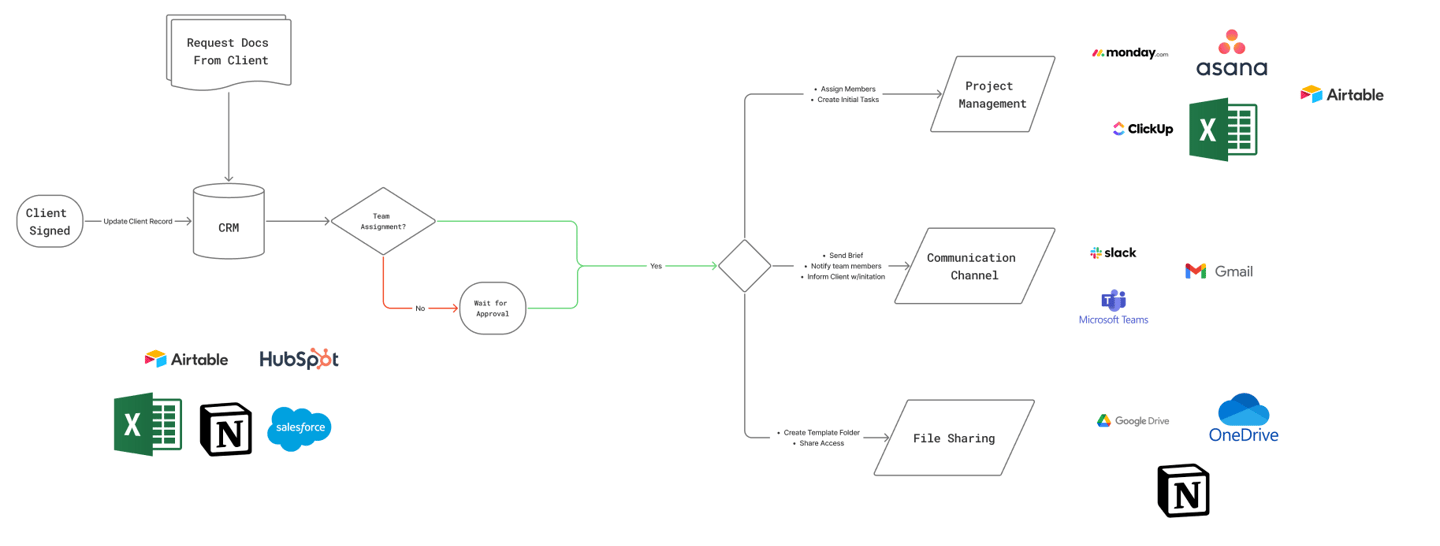
Trigger: Client signs contract in your CRM (Airtable, HubSpot, Salesforce)
What happens automatically:
Document Collection
Client receives branded email with document request form
Automated follow-up reminders if documents aren't submitted within 48 hours
Documents auto-upload to organized Google Drive/OneDrive folder structure
Team Assignment & Resource Allocation
Workflow checks team availability in CRM
If team capacity exists → Auto-assign members
If approval needed → Routes to manager for review
Team members notified automatically
Project Setup
Project created in Asana/Monday/ClickUp with pre-built template
Initial tasks assigned with due dates
Client-specific details auto-populated from CRM
Communication & Collaboration
Team channel created in Slack/Teams with relevant members
Automated brief sent with client goals, scope, and notes from sales call
Client receives welcome email with portal access and next steps
File Organization
Template folder structure created in Google Drive/OneDrive/Notion
Access permissions automatically set based on team roles
Client granted view/edit access to specific folders
The Automated Result:
5-10 minutes of setup time (90% reduction)
Same-day completion (not 3-4 days)
Zero human errors from manual data entry
Consistent experience for every client
Scalable regardless of volume spikes
Businesses implementing workflow automation see an average 340% ROI within 18 months Medium, and SMBs achieve ROI in 13 months compared to 22 months for enterprises G2.
The Tools Working Together
Your automation connects:
CRM Layer: Airtable, HubSpot, Salesforce, Excel
Project Management: Asana, Monday.com, ClickUp, Airtable
Communication: Slack, Gmail, Microsoft Teams
File Storage: Google Drive, OneDrive, Notion
Instead of jumping between 8-12 platforms manually, automation orchestrates them into one seamless workflow—triggered the moment your client signs.
Real Impact on Your Business
Time Reclaimed:
Operations manager: 15-20 hours/week saved
Project coordinators: 10-12 hours/week saved
Account managers: 8-10 hours/week saved
Quality Improvements:
95% reduction in onboarding errors
100% consistency across all client experiences
Zero forgotten tasks or missed communications
Client Experience: 70% of customers say onboarding is a critical deciding factor in winning and keeping their business GainsightDealHub. Automated onboarding ensures every client feels prioritized—even when you're onboarding 20 clients simultaneously.
The Bottom Line
Your current manual process:
Takes 4-8 hours per client
Creates 3-4 day delays
Breaks down during busy seasons
Delivers inconsistent experiences
Automated onboarding:
Takes 5-10 minutes of setup
Completes same-day
Scales effortlessly
Delivers white-glove consistency
The question isn't whether you should automate, it's how much revenue you're losing by waiting.